Generate Invoice PDFs from JSON with PodPDF Templates
Design an invoice once in a visual editor, then create PDFs by sending JSON: line items, tax and totals calculated, any paper size, from $0.005 per PDF.
Every business that sends invoices eventually hits the same wall. The first version is an HTML string glued together in code. Then somebody wants the logo bigger, the tax line only when there is tax, a second page that repeats the table header, dates in German for the Berlin office. Each change is a deploy, and the person asking for it can’t make it themselves.
PodPDF templates split the job in two. The layout lives in a template that anyone can edit in the dashboard. Your code only sends the values, as JSON, and gets the finished PDF back.
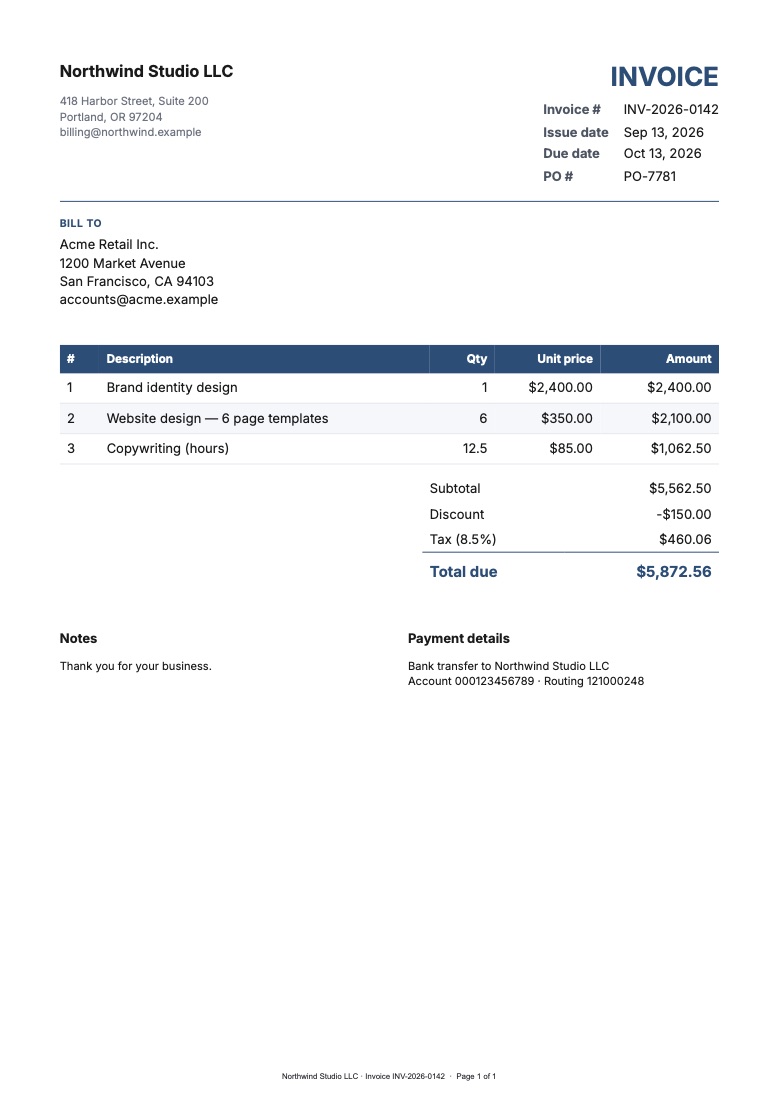
What a Template Is
A template is a page made of blocks — a heading, the company and customer addresses, a details list, the items table, the totals, notes, a footer — plus a list of fields. A field is a value that changes per document, and its key is the JSON property you send:
| Field | JSON key | Example |
|---|---|---|
| Invoice number | invoice_number | "INV-1042" |
| Issue date | issue_date | "2026-09-13" |
| Customer name | customer.name | "Acme Retail Inc." |
| Line items | items | [{ "description": "Design", ... }] |
| Tax rate | tax_rate | 8.5 (meaning 8.5%) |
Anywhere in the layout, a field is shown with {{invoice_number}}. You insert fields from a menu, so there is nothing to memorise.
Start from the Invoice Starter
Open Templates → Template library in the dashboard and pick Invoice (A4) or Invoice (US Letter). You get your own copy to change:
- Blocks on the left: add, reorder and remove parts of the page
- Page & style: paper size, margins, font, accent colour, and the language, currency and date format used for numbers
- Properties on the right: edit the selected block — the items table columns, the totals rows, the footer text
- The preview in the middle updates as you type, using the same renderer that produces the PDF
Click Fields & test data to see the JSON contract. Mark fields Required and the API rejects requests that leave them out, instead of producing an invoice with a blank customer name.
Totals Without Code
The totals block does the maths from the items list:
- Each line is
quantity × unit_price - Subtotal is the sum of the lines
- Discount is subtracted — an amount, or a percentage of the subtotal
- Tax is the tax rate applied to the discounted subtotal
- Shipping is added, and Total is the result
Everything is rounded to the currency’s smallest unit (cents, pence, or whole yen) and formatted for the template’s language: $5,872.56 in US English, 5.872,56 € in German. If your own system already calculates a figure — for example the tax from an accounting package — set that totals row to read a field, and the amount you send is used instead of the calculated one.
Generate a PDF
In the builder, Generate PDF opens a form built from the fields. Fill it in and the PDF downloads. That is enough for someone who sends a handful of invoices a week.
To automate it, click Use via API. It shows the request for this exact template with every field filled in:
curl -X POST https://api.podpdf.com/templates/01J8ZK3QW5V7N2B4X6C8D0E2F4/render \
  -H "X-API-Key: YOUR_API_KEY" \
  -H "Content-Type: application/json" \
  -o INV-1042.pdf \
  -d '{
    "data": {
      "company": { "name": "Northwind Studio LLC", "address": "418 Harbor Street\nPortland, OR 97204" },
      "invoice_number": "INV-1042",
      "issue_date": "2026-09-13",
      "due_date": "2026-10-13",
      "customer": { "name": "Acme Retail Inc.", "address": "1200 Market Avenue\nSan Francisco, CA 94103" },
      "items": [
        { "description": "Brand identity design", "quantity": 1, "unit_price": 2400 },
        { "description": "Website design — 6 page templates", "quantity": 6, "unit_price": 350 }
      ],
      "tax_rate": 8.5
    },
    "filename": "INV-1042.pdf"
  }'
The response is the PDF. The X-Job-Id and X-PDF-Pages headers tell you which job it was and how many pages it has, and the render appears under Jobs in the dashboard.
JavaScript
const response = await fetch(`https://api.podpdf.com/templates/${TEMPLATE_ID}/render`, {
  method: 'POST',
  headers: { 'X-API-Key': process.env.PODPDF_API_KEY, 'Content-Type': 'application/json' },
  body: JSON.stringify({
    data: {
      invoice_number: order.number,
      issue_date: order.createdAt.slice(0, 10),
      customer: { name: order.customer.name, address: order.customer.address },
      items: order.lines.map((line) => ({
        description: line.name,
        quantity: line.quantity,
        unit_price: line.price,
      })),
      tax_rate: order.taxRate,
    },
  }),
});

if (!response.ok) throw new Error(JSON.stringify(await response.json()));
const pdf = Buffer.from(await response.arrayBuffer());
Python
import os, requests

response = requests.post(
    f'https://api.podpdf.com/templates/{TEMPLATE_ID}/render',
    headers={'X-API-Key': os.environ['PODPDF_API_KEY']},
    json={'data': {
        'invoice_number': 'INV-1042',
        'issue_date': '2026-09-13',
        'customer': {'name': 'Acme Retail Inc.'},
        'items': [{'description': 'Consulting', 'quantity': 3, 'unit_price': 125.5}],
        'tax_rate': 20,
    }},
)
response.raise_for_status()
open('INV-1042.pdf', 'wb').write(response.content)
Prefer a link over the file? Add "store": true and the response is JSON with a download_url that stays valid for 1 hour.
When the Data Is Wrong
Invoices are exactly the documents where a silent mistake is expensive. If the data doesn’t match the template, nothing is generated and nothing is charged — you get every problem at once:
{
  "error": {
    "code": "TEMPLATE_DATA_INVALID",
    "details": {
      "errors": [
        { "field": "invoice_number", "error": "is required" },
        { "field": "items[1].quantity", "error": "must be a number" },
        { "field": "issue_date", "error": "must be an ISO date such as 2026-09-13" }
      ]
    }
  }
}
Field paths point at the exact row, so logging the list is usually enough to find the bad record.
Long Invoices
An invoice with dozens of lines flows onto more pages the way a printed document should: the table header repeats at the top of each page, a row is never cut in half, and the footer can read “Page 2 of 3”. Each PDF can have up to 25 pages.
Changing the Design Later
The template keeps its ID when you edit and save it, so your integration picks up the new layout on the next call — no deploy. To try a redesign without touching live invoices, Duplicate the template, change the copy, and switch the ID when you’re happy.
Proforma Invoices and Credit Notes
The library has two more invoice templates, with the same line items, tax and totals:
| Template | Use it when | Extra fields |
|---|---|---|
| Proforma invoice | Payment is due before delivery, a customer needs approval, or goods cross a border | proforma_number, valid_until, delivery_terms |
| Credit note | You refund, accept a return, or correct an invoice | credit_note_number, original_invoice, reason in notes |
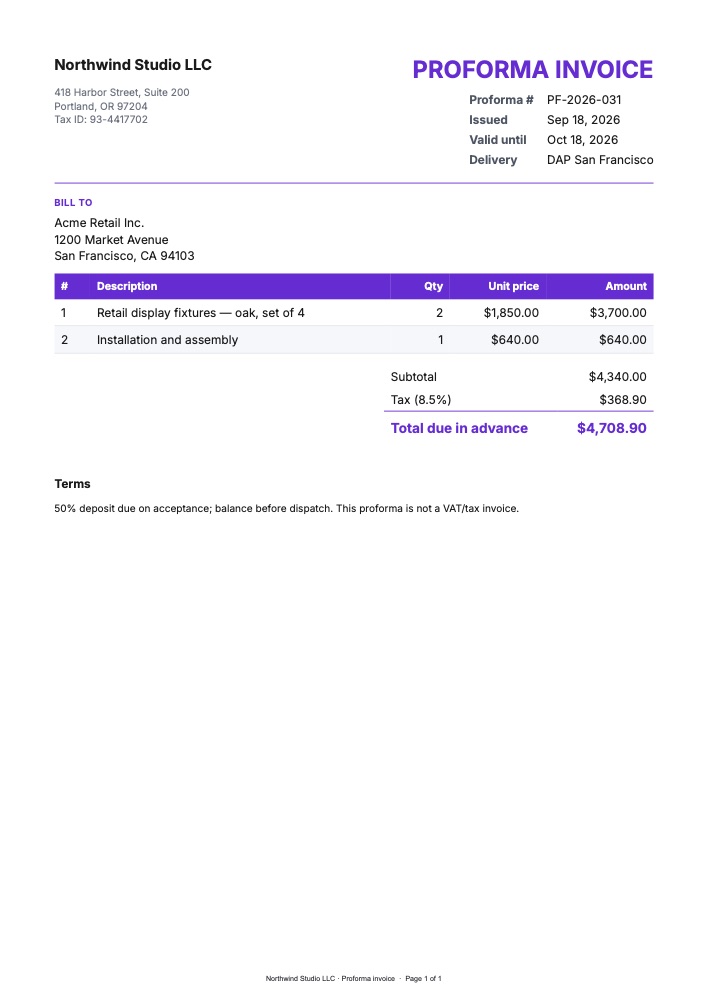
A proforma invoice is a commitment to supply at a price rather than a bill for delivered goods, so it says PROFORMA INVOICE and the total reads Total due in advance. Customs brokers and importers often ask for one before goods ship. When the goods go out, send the same line items to the invoice template.
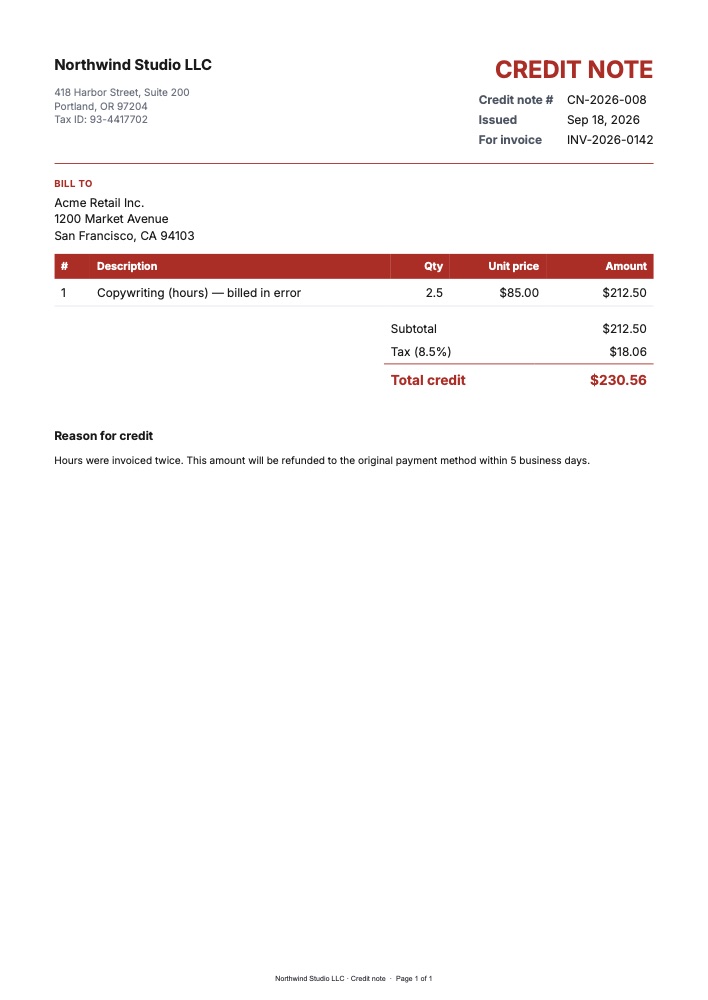
A credit note references the original invoice number, lists what’s being credited and gives the reason. Its total reads Total credit. Send the lines as positive amounts; the heading makes clear they are credited.
Together with quotes and estimates and account statements, that covers the whole billing cycle from one set of data.
Pricing
A template render costs the same as any PDF: $0.005 on a monthly plan, or $0.01 from one-off credits. Requests rejected for invalid data are free.
Get Started
- Open the template library and customise the invoice starter
- Read the templates guide and the API reference
- Related guides: quotes and estimates, purchase orders, statements and bills
- See all the ready-made PDF templates, or read about 80 mm receipts, shipping labels and certificates in bulk