Create 80 mm and 58 mm Thermal Receipt PDFs from JSON
Generate till receipts for 80 mm or 58 mm roll printers: the page length follows the items, totals and tax are calculated, with a scannable barcode.
Receipts are the awkward cousin of invoices. The paper is a roll, not a sheet: 80 mm or 58 mm wide and as long as the order. Most PDF tools only know fixed page sizes, so a two-item receipt comes out with a metre of blank paper, or a long order gets chopped onto a second “page” that the printer then cuts in the middle.
The PodPDF receipt template is built for rolls. Its width is fixed and its length follows the content, so every receipt is exactly as long as it needs to be.
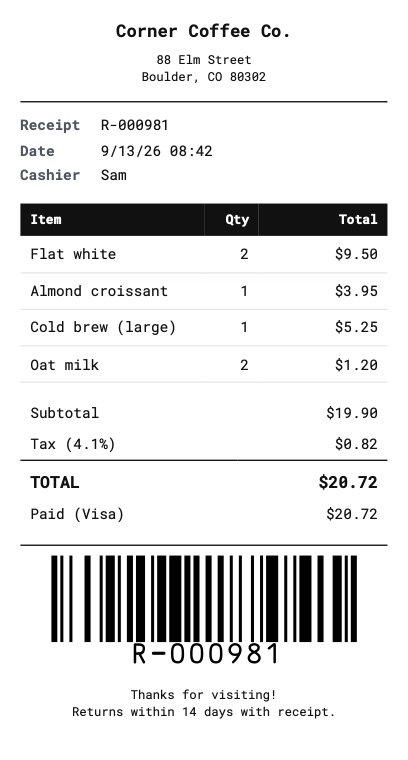
The Receipt Starter
Open Templates → Template library and choose Receipt (80 mm thermal). It includes:
- Store name and address, centred
- Receipt number, date and time, and cashier
- An items table with quantity and a calculated line total
- Subtotal, tax, the total and the amount paid with the payment method
- A Code 128 barcode of the receipt number, for returns and lookups
- A thank-you message
It uses Roboto Mono, a clear fixed-width font that looks at home on a till receipt and stays readable at small sizes.
80 mm or 58 mm
Open Page & style and choose the paper:
| Paper | Typical printers |
|---|---|
| Receipt 80 mm | Countertop POS printers in shops and restaurants |
| Receipt 58 mm | Handheld and mobile printers, card terminals |
For anything else — a 76 mm kitchen printer, for example — pick Custom size, set the width, and turn on Length grows with content. Margins default to a few millimetres so nothing lands on the printer’s unprintable edge.
Send an Order, Get a Receipt
The fields match what a point-of-sale system already knows:
curl -X POST https://api.podpdf.com/templates/YOUR_TEMPLATE_ID/render \
  -H "X-API-Key: YOUR_API_KEY" \
  -H "Content-Type: application/json" \
  -o R-000981.pdf \
  -d '{
    "data": {
      "store": { "name": "Corner Coffee Co.", "address": "88 Elm Street\nBoulder, CO 80302" },
      "receipt_number": "R-000981",
      "date": "2026-09-13",
      "time": "08:42",
      "cashier": "Sam",
      "items": [
        { "name": "Flat white", "qty": 2, "price": 4.75 },
        { "name": "Almond croissant", "qty": 1, "price": 3.95 }
      ],
      "tax_rate": 4.1,
      "payment_method": "Visa",
      "amount_paid": 14.00,
      "footer_message": "Thanks for visiting!"
    }
  }'
The template multiplies qty by price for each line, adds them up, applies the tax rate and prints the total — so the receipt always adds up, even when the data comes from several systems.
Printing on a Thermal Printer
The PDF is a single page exactly as wide as the roll, so it prints the same way from any computer:
- Set the printer’s paper size to the roll width (80 mm or 58 mm) and continuous length
- Print at 100% / actual size — “fit to page” shrinks the text
- Most POS printers cut automatically at the end of the job; since the PDF ends where the receipt ends, the cut lands in the right place
Many businesses don’t print at all any more: emailing the PDF, or showing a QR code that links to it, is often enough. Add "store": true to the request to get a download link instead of the file.
Longer Orders
A catering order with dozens of lines is still one continuous receipt — no page breaks, no repeated headers, just a longer strip of paper. Rows never split across a page on fixed-size paper either, so switching the same template to A5 for a printed order confirmation works too.
Receipts from Your Shop Platform
If your orders live in Shopify, WooCommerce, Square or a spreadsheet, you don’t need to write a server:
- In Zapier, add a Webhooks by Zapier → Custom Request step with the JSON body above (see the PodPDF API in Zapier)
- In n8n, use an HTTP Request node with your API key as a header credential (see the PodPDF API in n8n)
Map the order’s fields onto the JSON keys shown in Use via API in the builder, and send the PDF on to email, cloud storage or your printer.
Pricing
Each receipt is one PDF at $0.01. Orders rejected because a value is missing or invalid aren’t charged, and the error names the exact field — for example items[3].price must be a number (amount).
Get Started
- Customise the receipt starter in the dashboard
- Read the templates API reference
- Other receipts: rent and donation receipts
- See every ready-made PDF template, or read how invoices work