Generate Account Statements and Utility Bills as PDF
Create customer account statements and utility-style bills with usage, charges, tax, balance due and a barcoded payment slip, from JSON via API.
Invoices say what one sale costs. Statements and bills say where the whole account stands: what was charged this period, what was paid, what’s still owed and by when. They go out on a schedule — monthly, quarterly — to every customer at once, so they have to be generated from data, not typed up.
The Bills & statements group in the PodPDF template library has two templates for this: an account statement and a utility bill.
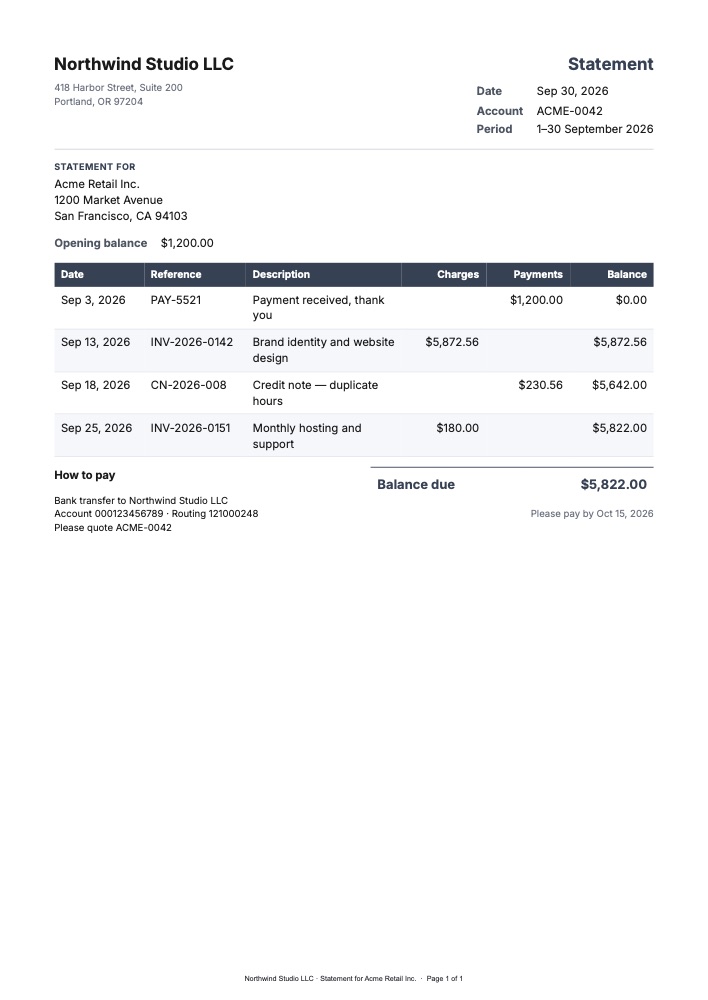
Account Statements
The account statement lists every invoice, payment and credit for a period with a running balance, then the balance due, the payment deadline and how to pay.
| Field | Example |
|---|---|
customer.name, customer.address | Acme Retail Inc., 1200 Market Avenue… |
account_number, period | ACME-0042, 1–30 September 2026 |
statement_date | 2026-09-30 |
opening_balance | 1200 → $1,200.00 |
transactions | One row per invoice, payment or credit (below) |
closing_balance | 5822 → Balance due $5,822.00 |
due_date, payment_details | Oct 15, 2026 · bank details |
Each row of transactions has a date, reference, description, and either charges or payments, plus the balance after it:
{
  "transactions": [
    {
      "date": "2026-09-03",
      "reference": "PAY-5521",
      "description": "Payment received, thank you",
      "payments": 1200,
      "balance": 0
    },
    {
      "date": "2026-09-13",
      "reference": "INV-2026-0142",
      "description": "Brand identity and website design",
      "charges": 5872.56,
      "balance": 5872.56
    },
    {
      "date": "2026-09-18",
      "reference": "CN-2026-008",
      "description": "Credit note — duplicate hours",
      "payments": 230.56,
      "balance": 5642
    }
  ]
}
The balances come from your accounting system. Running balances depend on your rules — which date counts, how credits and partial payments apply — so the template prints the balance values and the closing_balance you send rather than recalculating them. That keeps the statement identical to your ledger.
A busy account’s statement runs onto more pages with the column headings repeated, up to 25 pages, and the footer shows “Page 2 of 3”.
Utility Bills
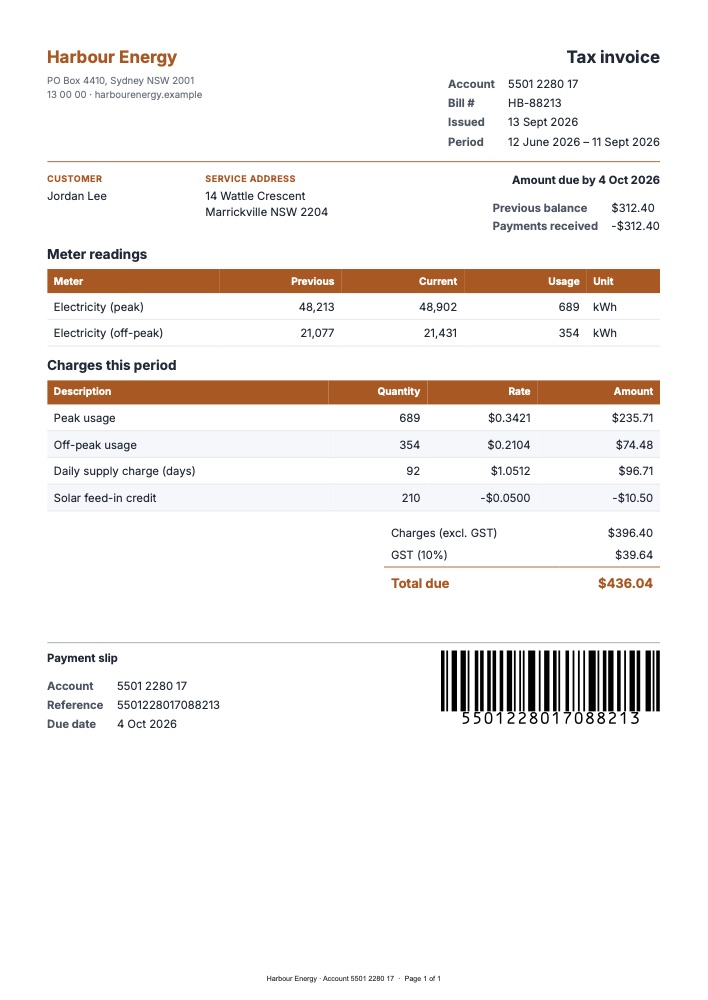
The utility bill is laid out like an energy, water or telecom bill:
- Header: provider, account number, bill number, issue date and billing period
- Summary: customer and service address, amount due and due date, previous balance and payments received
- Meter readings: meter, previous and current readings, usage and unit
- Charges: each line is
quantity × unit_rate— rates print to four decimal places, like$0.3421per kWh - Totals: charges before tax, GST or VAT at
gst_rate, and the total due - Payment slip: account, reference and due date, with a Code 128 barcode of
payment_referencefor payment counters and scanners
Negative lines work as expected: a solar feed-in credit of 210 × -0.05 prints -$10.50 and reduces the total. Rename GST to VAT or sales tax in the builder, and change the currency and language in Page & style (the starter uses Australian English and dollars).
Use Cases
- B2B suppliers and wholesalers: monthly statements for customers on credit terms
- Agencies and consultancies: statements showing all open invoices for a client
- Property management: tenant statements with rent charges and payments
- Utilities and energy retailers: bills with meter readings and usage-based charges
- Telecom and ISPs: plan and usage charges per billing period
- Clubs, schools and memberships: fee statements for members or parents
- Collections: reminder statements before an account goes overdue
Statement Day
Send one statement per customer from a scheduled job:
for (const account of accountsWithBalance) {
  const response = await fetch(`https://api.podpdf.com/templates/${TEMPLATE_ID}/render`, {
    method: 'POST',
    headers: { 'X-API-Key': process.env.PODPDF_API_KEY, 'Content-Type': 'application/json' },
    body: JSON.stringify({
      data: toStatementData(account),
      filename: `statement-${account.number}.pdf`,
    }),
  });
  if (!response.ok) {
    console.error(account.number, (await response.json()).error.details);
    continue;
  }
  await sendStatementEmail(account, Buffer.from(await response.arrayBuffer()));
}
A customer record with a missing field is skipped with the field named (for example transactions[4].date must be an ISO date such as 2026-09-13) and isn’t charged; the other statements still go out. If your billing system already produces one long PDF of all statements, split it into one file per customer instead.
Prefer no code? Schedule a Zapier or n8n workflow that reads accounts from your spreadsheet or accounting tool and calls the render endpoint for each (Zapier, n8n).
Pricing
Each statement or bill is one PDF at $0.01. For regular monthly runs, a monthly plan’s allowance covers them; see pricing.
Get Started
- Open the template library and filter by Bill / statement
- Read the templates API reference
- Related guides: invoices from JSON, rent and donation receipts, all PDF templates