Barcode Label PDF API: EAN-13, Asset and Address Labels
Generate printable barcode labels from JSON: EAN-13 price tags, Code 128 asset tags with QR codes, and 4 × 2 in address labels for label printers.
Label printing is full of small, exact requirements. A shelf tag must be the size of the label roll, the EAN-13 must carry the right check digit, the asset tag’s barcode must be wide enough for the warehouse scanner, and a mailing label must put the address where a person can read it. Get any of those wrong and the labels go in the bin.
PodPDF templates produce labels as PDFs sized to the label, with barcodes drawn as vectors so they print crisply on thermal and laser printers. You send the product, asset or address as JSON; the barcode is generated from it.
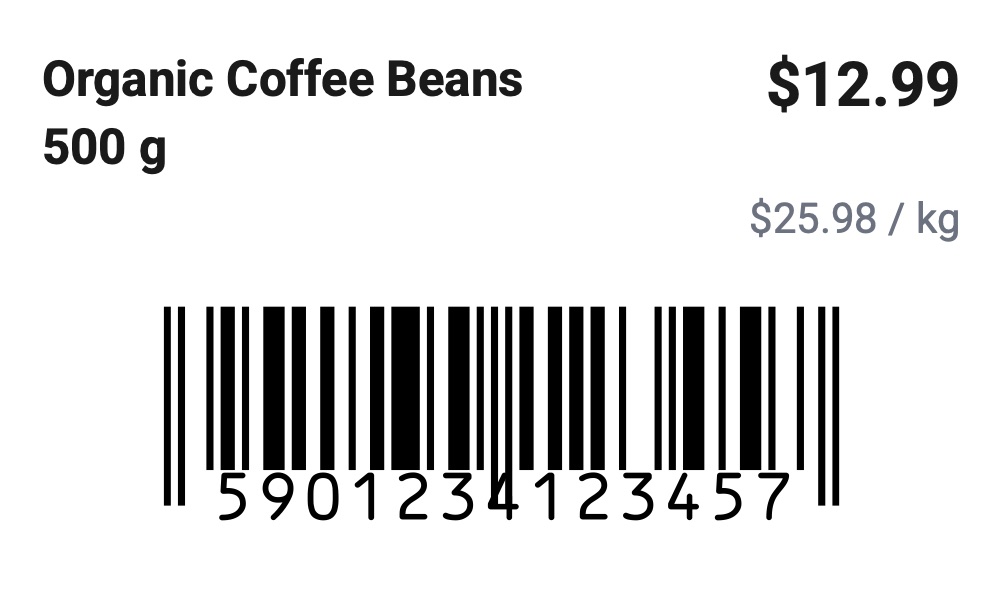
The Label Templates
Open Templates → Template library and filter by Labels & QR codes:
| Template | Size | Barcode | Fields |
|---|---|---|---|
| Product price label | 50 × 30 mm | EAN-13 | product_name, price, ean, unit |
| Asset tag label | 62 × 29 mm | Code 128 and QR code | company, asset_id, description, qr_url |
| Address label | 4 × 2 in | — | return_address, recipient_name, recipient_address |
| QR code only | 50 × 50 mm | QR code | qr_value, caption |
62 × 29 mm, 50 × 30 mm and 4 × 2 in are common sizes for desktop label printers. For anything else, choose Custom size in Page & style and enter your label’s width and height.
Price Tags with EAN-13
curl -X POST https://api.podpdf.com/templates/YOUR_TEMPLATE_ID/render \
  -H "X-API-Key: YOUR_API_KEY" \
  -H "Content-Type: application/json" \
  -o 5901234123457.pdf \
  -d '{
    "data": {
      "product_name": "Organic Coffee Beans 500 g",
      "price": 12.99,
      "ean": "5901234123457",
      "unit": "$25.98 / kg"
    }
  }'
price is formatted in the template’s currency and language — $12.99, 12,99 € or £12.99 — so your data stays a plain number. ean can be 12 digits (the check digit is added) or 13 digits (the check digit is verified).
A wrong code is caught before anything prints. An EAN with the wrong number of digits or a bad check digit returns:
{
  "error": {
    "code": "TEMPLATE_DATA_INVALID",
    "details": {
      "errors": [
        { "field": "ean", "error": "is not a valid EAN-13 value: EAN-13 must be 12 or 13 digits" }
      ]
    }
  }
}
Nothing is generated and nothing is charged, so a bad row in a product feed doesn’t turn into a shelf of unscannable tags.
Asset Tags with Code 128 and a QR Code
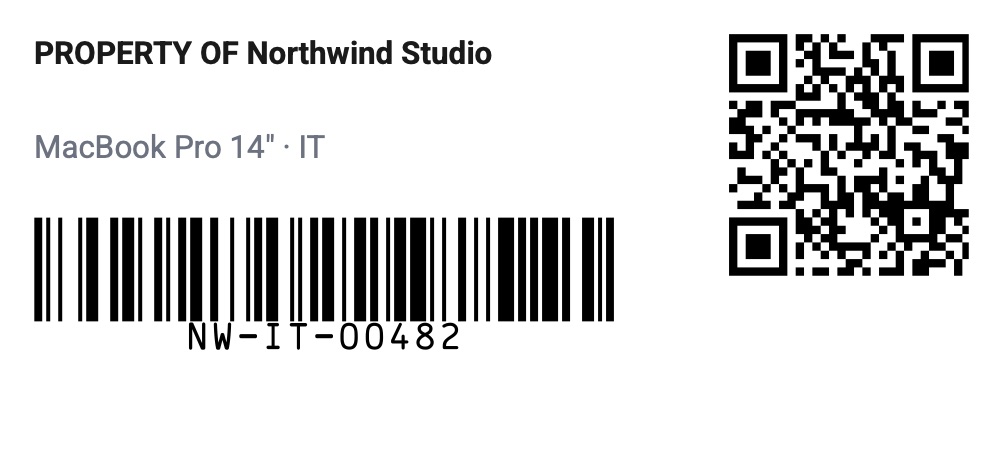
The asset tag carries two codes for two jobs:
- Code 128 of
asset_idfor handheld barcode scanners in stock-takes and audits - QR code of
qr_urlso anyone with a phone can open the asset’s record — a maintenance log, a booking page, a “report a fault” form
{
  "data": {
    "company": "Northwind Studio",
    "asset_id": "NW-IT-00482",
    "description": "MacBook Pro 14\" · IT",
    "qr_url": "https://assets.northwind.example/NW-IT-00482"
  }
}
Code 128 handles letters, digits and punctuation, so existing asset numbers work as they are.
Address Labels
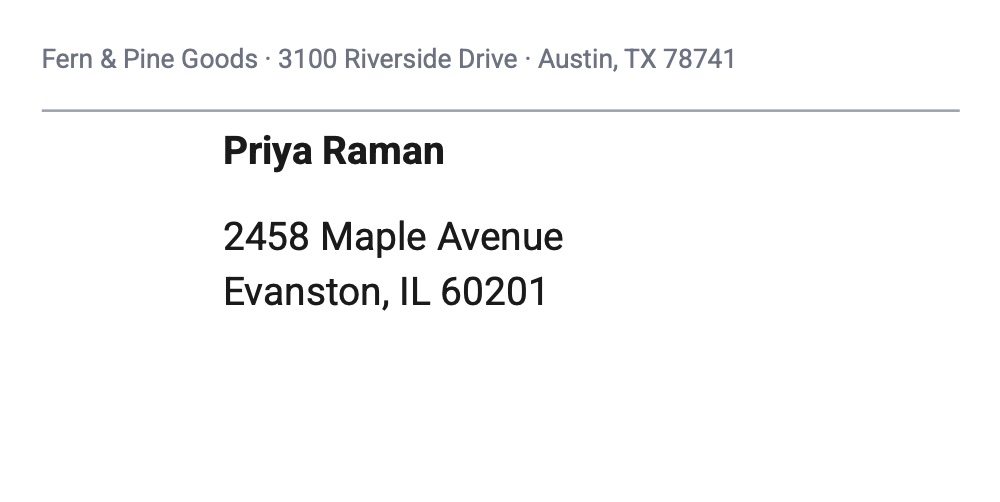
The address label prints your return address small at the top and the recipient large and bold below. Line breaks in recipient_address (\n) are kept, so send addresses the way your system stores them. For parcels with tracking barcodes, use the 4 × 6 shipping label instead.
Use Cases
- Retail and grocery: shelf-edge and product price tags from your product catalogue or POS, reprinted whenever prices change
- Warehouses and e-commerce: SKU labels with EAN-13 for inbound stock, bin labels with Code 128
- IT and facilities: asset tags for laptops, monitors, furniture and tools, linked to your asset register
- Schools and libraries: equipment and book labels with a QR code to the borrowing record
- Makers and small shops: product labels for handmade goods, with a QR code to reorder
- Mail rooms: address labels for letters, samples and catalogues
Printing a Batch
Every render is one label. To print a run:
- Loop over your products or assets and render each one (a spreadsheet row per label works well with Zapier or n8n)
- Combine the files with Merge PDF — each label stays on its own page, exactly the label’s size
- Print the merged file on the label printer at actual size, with the paper set to your label size
Roll label printers feed one label per page, which is exactly what the merged PDF contains.
Barcode Reference
| Barcode | Accepts | Typical use |
|---|---|---|
| EAN-13 | 12 or 13 digits | Retail products, point of sale |
| Code 128 | Letters, digits and punctuation | SKUs, asset IDs, tracking numbers |
| QR code | Any text or URL | Links, contact cards, Wi-Fi |
Any template can have barcode blocks: add one from the palette, pick the type, and set its value to a field such as {{sku}}, or mix text and fields such as INV-{{invoice_number}}. See the QR code guide for more on QR values.
Pricing
Each label is one PDF at $0.01. Labels rejected for an invalid barcode or missing field are not charged.
Get Started
- Customise a label in the template library
- Read the templates API reference
- Related guides: QR codes, 4 × 6 shipping labels, all PDF templates