Print 4×6 Shipping Labels with Barcodes from JSON
Generate 4×6 inch shipping label PDFs with Code 128 and QR codes from order data, plus A4 packing slips, using PodPDF templates and one API call.
A shipping label has very little room for error. It has to be exactly 4×6 inches so the thermal label printer doesn’t scale it, the address has to be big enough to read from across a warehouse, and the tracking barcode has to scan the first time. Pasting addresses into a word processor stops working after about the tenth order of the day.
With PodPDF templates, the label layout is designed once and every order becomes a label with one API call.
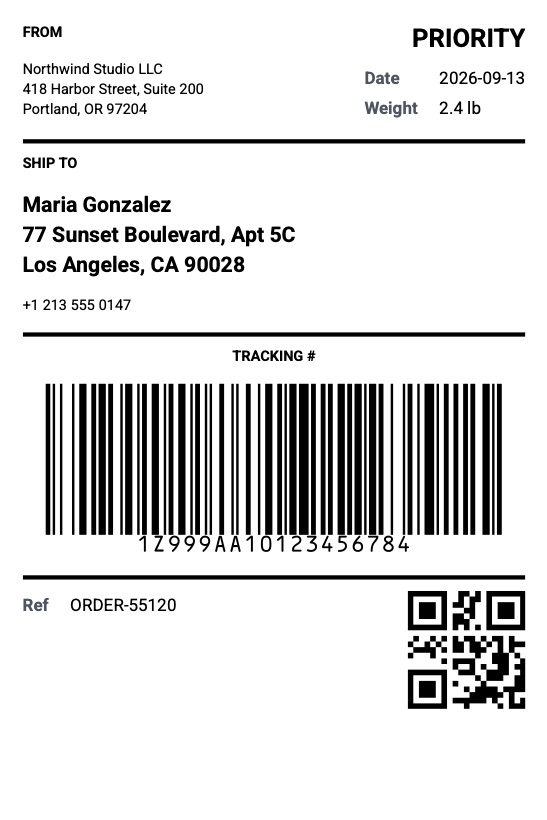
The Label Starter
Pick Shipping label (4×6 in) in Templates → Template library. The page is 101.6 × 152.4 mm — the standard size for desktop label printers — and includes:
- From address and the shipping service in large type (for example PRIORITY)
- Ship date and parcel weight
- Ship to name, address and phone, in bold
- The tracking number as a Code 128 barcode, with the number printed underneath
- A QR code of the tracking number and your order reference
Barcodes are generated as vector graphics, so they stay sharp at any printer resolution instead of blurring like a pasted image.
One Order, One Label
curl -X POST https://api.podpdf.com/templates/YOUR_TEMPLATE_ID/render \
  -H "X-API-Key: YOUR_API_KEY" \
  -H "Content-Type: application/json" \
  -o label-ORDER-55120.pdf \
  -d '{
    "data": {
      "service": "PRIORITY",
      "ship_date": "2026-09-13",
      "weight": "2.4 lb",
      "from": { "name": "Northwind Studio LLC", "address": "418 Harbor Street, Suite 200\nPortland, OR 97204" },
      "to": {
        "name": "Maria Gonzalez",
        "address": "77 Sunset Boulevard, Apt 5C\nLos Angeles, CA 90028",
        "phone": "+1 213 555 0147"
      },
      "tracking_number": "1Z999AA10123456784",
      "reference": "ORDER-55120"
    }
  }'
Line breaks in the address (\n) are kept, so send the address the way your store formats it.
Barcode Types
Any template can have barcode blocks. Choose the type in the block’s properties:
| Type | Use it for |
|---|---|
| Code 128 | Tracking numbers, order numbers, SKUs — letters and digits |
| QR code | Links (a tracking page, a returns form) and longer text |
| EAN-13 | Retail product barcodes: 12 digits, or 13 with the check digit |
The barcode value can mix text and fields, for example https://track.example.com/{{tracking_number}} for a QR code that opens the tracking page.
A value that can’t be encoded is caught before anything is printed. For example, if a template prints {{product_code}} as an EAN-13 and an order has the wrong number of digits, the request returns TEMPLATE_DATA_INVALID with product_code is not a valid EAN-13 value: EAN-13 must be 12 or 13 digits rather than a label that won’t scan.
Packing Slips Too
The Packing slip (A4) starter covers the other document in the box: store details, an order QR code, ship-to and bill-to addresses, an items table with SKU, variant and quantity, a Packed column to tick by hand, and an optional gift message. Send the same order data to both templates and you have the label and the slip.
Delivery Notes
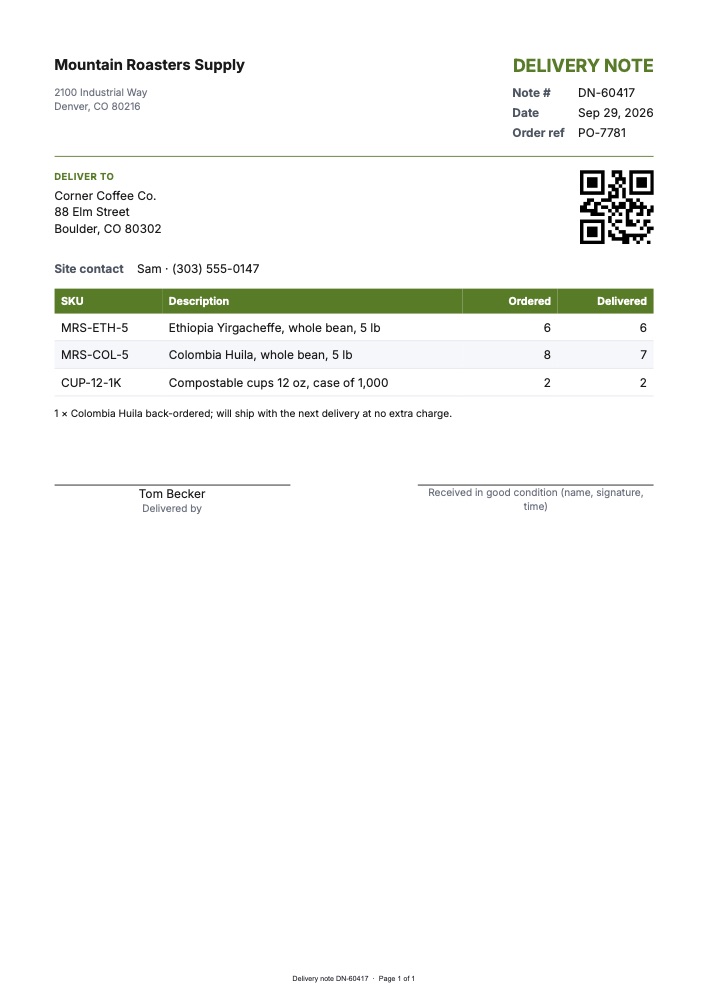
When goods are delivered rather than posted, the Delivery note (A4) template is the driver’s paperwork: the delivery number and date, the order reference (your customer’s PO number), the delivery address and site contact, a table of ordered and delivered quantities per SKU, notes such as back-orders, and signature lines for the driver and for the person receiving the goods. A QR code of the delivery number lets your team scan it back in when the signed copy returns.
Generate it from the same order data as the label — the items just need an ordered and a delivered quantity. If the order started as a purchase order, put its number in order_reference.
Printing Labels
- Set the label printer’s paper size to 4×6 in (sometimes listed as 100 × 150 mm)
- Print at actual size — don’t let the driver fit or rotate the page
- For a batch, merge the day’s labels into one PDF first with Merge PDF and print once
A Day of Orders
When orders arrive all day, trigger a render per order from your store:
- Zapier: New order in Shopify or WooCommerce → Webhooks by Zapier → Custom Request to the render endpoint → save the PDF to Google Drive or send it to your printing service (setup guide)
- n8n: an order webhook → HTTP Request node → Write Binary File or an email node (setup guide)
At the end of the day, merge the labels into one file for a single print run.
Pricing
Each label or packing slip is one PDF at $0.01. Invalid addresses or barcodes are rejected before rendering and aren’t charged.
Get Started
- Customise the shipping label starter
- Read the templates API reference
- Related guides: barcode and address labels, QR codes in PDFs, purchase orders
- Browse all PDF templates, or read about invoices from JSON