Generate Certificates in Bulk from a Spreadsheet
Turn a CSV of course graduates or event attendees into personalised certificate PDFs with signatures and verification QR codes, using a PodPDF template.
The course is over, the conference has ended, and there is a spreadsheet with a few hundred names. Each person needs a certificate with their name spelled correctly, the right course title and date, a signature, and ideally a way for an employer to check it is genuine. Doing it in a slide deck means an afternoon of copy and paste and at least one misspelt name.
This guide turns that spreadsheet into certificate PDFs with a PodPDF template and a short script.
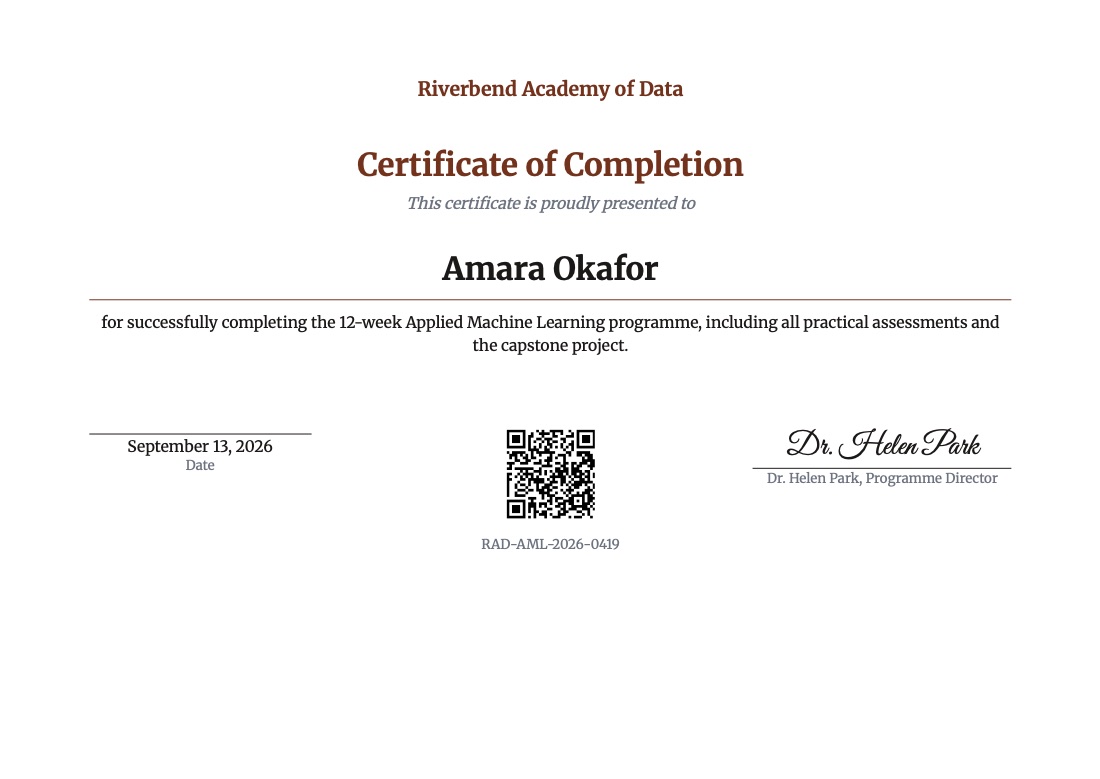
Set Up the Certificate
In Templates → Template library, choose Certificate (A4 landscape). It has:
- Your organisation and the certificate title
- The recipient’s name, large and centred
- A description of what they completed
- The issue date and a signature line with the signer’s name written in script
- A QR code of a verification link and the certificate ID underneath
Change the accent colour and font in Page & style to match your brand, upload your logo in an image block, and edit the wording. For US Letter, switch the paper and keep Landscape.
The fields you will fill from the spreadsheet:
| Column in your sheet | JSON key |
|---|---|
| Name | recipient_name |
| Course or event | title |
| What they did | description |
| Date | issue_date |
| Certificate number | certificate_id |
| Verification link | verify_url |
Fields that are the same for everyone — organization, signer.name, signer.title — can be typed straight into the template text instead of sent each time.
The Spreadsheet
Export your sheet as CSV:
recipient_name,title,issue_date,certificate_id
Amara Okafor,Certificate of Completion,2026-09-13,RAD-AML-2026-0419
Diego Hernández,Certificate of Completion,2026-09-13,RAD-AML-2026-0420
Mei Lin,Certificate of Completion,2026-09-13,RAD-AML-2026-0421
Names with accents — Hernández, Ångström, Łukasz — render correctly, because the fonts are embedded in the PDF.
The Script (Node.js)
This reads the CSV, renders a certificate per row a few at a time, and saves each PDF under its certificate ID:
import fs from 'node:fs/promises';

const TEMPLATE_ID = 'YOUR_TEMPLATE_ID';
const CONCURRENCY = 5;

const [header, ...rows] = (await fs.readFile('graduates.csv', 'utf8')).trim().split('\n');
const columns = header.split(',');
const people = rows.map((row) =>
  Object.fromEntries(row.split(',').map((value, i) => [columns[i], value]))
);

await fs.mkdir('certificates', { recursive: true });

async function render(person) {
  const response = await fetch(`https://api.podpdf.com/templates/${TEMPLATE_ID}/render`, {
    method: 'POST',
    headers: { 'X-API-Key': process.env.PODPDF_API_KEY, 'Content-Type': 'application/json' },
    body: JSON.stringify({
      data: {
        ...person,
        organization: 'Riverbend Academy of Data',
        description: 'for completing the 12-week Applied Machine Learning programme.',
        signer: { name: 'Dr. Helen Park', title: 'Programme Director' },
        verify_url: `https://riverbend.example/verify/${person.certificate_id}`,
      },
    }),
  });
  if (!response.ok) {
    const { error } = await response.json();
    throw new Error(
      `${person.recipient_name}: ${JSON.stringify(error.details?.errors ?? error.message)}`
    );
  }
  await fs.writeFile(
    `certificates/${person.certificate_id}.pdf`,
    Buffer.from(await response.arrayBuffer())
  );
}

const failed = [];
for (let i = 0; i < people.length; i += CONCURRENCY) {
  const batch = people.slice(i, i + CONCURRENCY);
  const results = await Promise.allSettled(batch.map(render));
  results.forEach((result) => result.status === 'rejected' && failed.push(result.reason.message));
  console.log(`${Math.min(i + CONCURRENCY, people.length)} / ${people.length}`);
}

if (failed.length) console.error('Not generated:\n' + failed.join('\n'));
The same thing in Python:
import csv, os, requests
from concurrent.futures import ThreadPoolExecutor

TEMPLATE_ID = 'YOUR_TEMPLATE_ID'
os.makedirs('certificates', exist_ok=True)

def render(person):
    data = {
        **person,
        'organization': 'Riverbend Academy of Data',
        'signer': {'name': 'Dr. Helen Park', 'title': 'Programme Director'},
        'verify_url': f"https://riverbend.example/verify/{person['certificate_id']}",
    }
    r = requests.post(
        f'https://api.podpdf.com/templates/{TEMPLATE_ID}/render',
        headers={'X-API-Key': os.environ['PODPDF_API_KEY']},
        json={'data': data},
    )
    if not r.ok:
        return f"{person['recipient_name']}: {r.json()['error']}"
    with open(f"certificates/{person['certificate_id']}.pdf", 'wb') as f:
        f.write(r.content)

with open('graduates.csv', newline='', encoding='utf-8') as f:
    people = list(csv.DictReader(f))

with ThreadPoolExecutor(max_workers=5) as pool:
    for problem in filter(None, pool.map(render, people)):
        print('Not generated:', problem)
A handful of requests in parallel is plenty: each certificate takes a few seconds, so a cohort of a few hundred people is done in minutes.
Catch Mistakes Before They’re Printed
Mark recipient_name, title and issue_date as Required in Fields & test data. A row with an empty name, or a date typed as 13/09/26, is then rejected with a message such as issue_date must be an ISO date such as 2026-09-13 — and isn’t charged. The script collects those rows at the end so you can fix the sheet and run only the failures again.
Verifiable Certificates
The QR code links to verify_url. Point it at a page on your site that looks up the certificate ID and shows the holder’s name and course. Anyone who receives the PDF can scan it to confirm the certificate is real, which is worth far more than a fancy border.
Sending Them Out
- Email each graduate their certificate with mail merge: the same template and spreadsheet, and every row gets its PDF attached, sent from your own mailbox
- Or upload the folder to cloud storage and share individual links
- Need one file with every certificate for the printer? Merge the PDFs in the order of your list
Pricing
Each certificate is one PDF at $0.01. A cohort of 300 graduates costs $3.00, and rows rejected for invalid data cost nothing.
Get Started
- Customise the certificate starter
- Read the templates guide
- Related guides: event tickets, invitations and badges, QR codes in PDFs
- Browse all PDF templates, or see how the same approach works for invoices