Create Quote and Estimate PDFs from JSON
Generate professional quotes and estimates with line items, VAT or sales tax, validity dates and an acceptance signature, from your CRM or a form.
A quote is often the first document a customer sees from you, and it has to be right: the items, the rates, the tax, the total, how long the price holds, and how to accept. It also has to be fast — the business that sends a clear quote the same afternoon usually wins the job.
The PodPDF Quote / Estimate template turns the data in your CRM, estimating tool or website form into a finished quote PDF.
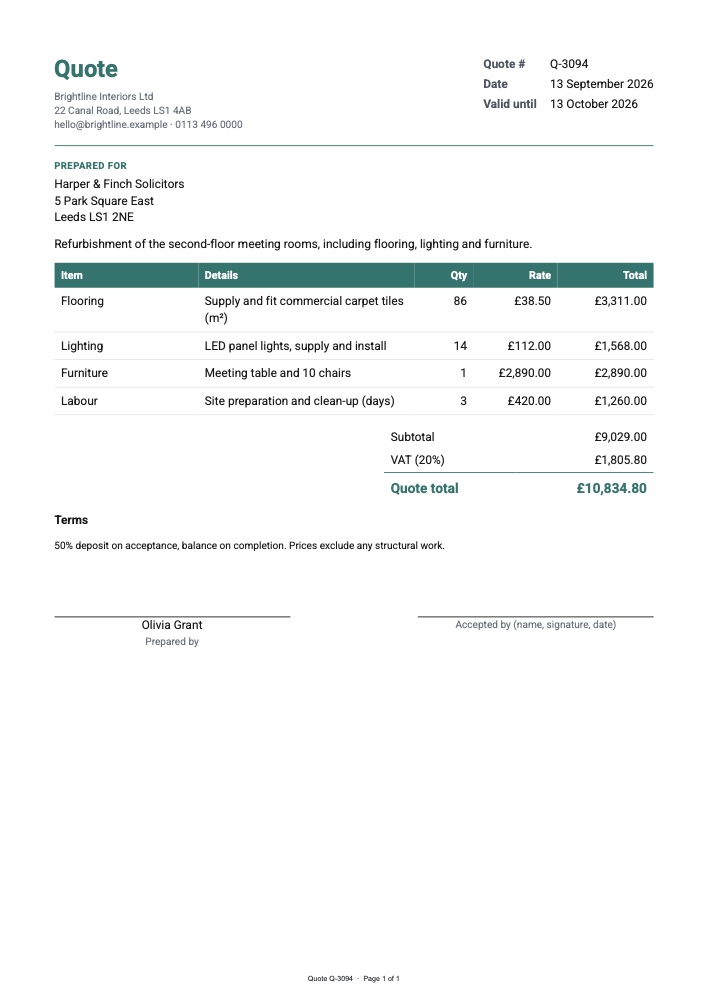
What’s on the Quote
- Your company name and details
- Quote number, date and valid until date
- Prepared for: the client’s name and address
- A project summary paragraph
- An items table with item, details, quantity, rate and a calculated total per line
- Subtotal, VAT (or sales tax) and the quote total
- Your terms — deposit, payment schedule, exclusions
- Two signature lines: Prepared by, and Accepted by for the client
One Call per Quote
curl -X POST https://api.podpdf.com/templates/YOUR_TEMPLATE_ID/render \
  -H "X-API-Key: YOUR_API_KEY" \
  -H "Content-Type: application/json" \
  -o Q-3094.pdf \
  -d '{
    "data": {
      "company": { "name": "Brightline Interiors Ltd", "details": "22 Canal Road, Leeds LS1 4AB\nhello@brightline.example" },
      "quote_number": "Q-3094",
      "quote_date": "2026-09-13",
      "valid_until": "2026-10-13",
      "client": { "name": "Harper & Finch Solicitors", "details": "5 Park Square East\nLeeds LS1 2NE" },
      "project": "Refurbishment of the second-floor meeting rooms.",
      "items": [
        { "item": "Flooring", "details": "Commercial carpet tiles (m²)", "quantity": 86, "rate": 38.5 },
        { "item": "Lighting", "details": "LED panels, supply and install", "quantity": 14, "rate": 112 },
        { "item": "Labour", "details": "Site preparation (days)", "quantity": 3, "rate": 420 }
      ],
      "vat_rate": 20,
      "terms": "50% deposit on acceptance, balance on completion.",
      "prepared_by": "Olivia Grant"
    }
  }'
Every line total is quantity × rate. The template adds the lines, applies vat_rate and prints the quote total, rounded to the currency and formatted for the template’s language. The starter uses British English and pounds with long dates (“13 October 2026”); switch to en-US and USD, or any other language and currency, in Page & style.
Quote, Proforma, Invoice
Quotes usually lead to more documents. Keep the same numbering and data, and render the next one when the deal moves on:
- Quote — what you propose, valid until a date
- Proforma invoice — when a deposit or payment in advance is needed, or for customs
- Invoice — when the work is delivered
- Credit note — if something is returned or corrected
Because each is a template with its own fields, converting a quote into an invoice is just sending the same line items to a different template ID.
Estimates Instead of Quotes
Some trades send estimates (an approximate price) rather than quotes (a fixed price). In the builder, change the heading to Estimate, the total label to Estimated total, and the terms to explain what could change the final price. Duplicate the template to keep both.
Use Cases
- Trades and construction: builders, electricians, decorators and landscapers pricing jobs from a site visit
- Agencies and consultancies: project proposals with phases as line items
- B2B sales: quotes generated from a CRM opportunity and emailed from the deal record
- Wholesale: price quotes for bulk orders with per-unit rates
- Event and venue hire: packages, extras and deposits
- Website quote forms: a customer configures a product on your site and gets an instant PDF quote
From Your CRM or a Form
Most quotes start from a record somewhere else. The quickest setups:
- Zapier: new deal stage in your CRM → Webhooks by Zapier → Custom Request to the render endpoint → email the PDF to the client (guide)
- n8n: a form or webhook → HTTP Request → Send Email with the PDF attached (guide)
- Your own code: render when the sales rep clicks Send quote, and store the PDF with the opportunity
Mark client.name, quote_number and items as Required (they are in the starter) and incomplete records are rejected with the missing field named, instead of producing a quote with a blank client name.
Long Quotes
A detailed quote with dozens of lines flows onto more pages with the table header repeated and “Page 2 of 3” in the footer, up to 25 pages. The totals and signatures follow the last line.
Pricing
Each quote is one PDF at $0.01. Rejected requests aren’t charged.
Get Started
- Customise the quote template in the dashboard
- Read the templates API reference
- Related guides: invoices, proformas and credit notes, purchase orders, all PDF templates