Mail Merge Letters and Envelopes to PDF with an API
Generate personalised business letters on your letterhead and matching DL envelopes as PDFs from JSON: a mail merge you can run from code or a spreadsheet.
Mail merge is one of the oldest office jobs there is: one letter, many recipients, each with their own name, address and details. Word processors do it well for a one-off mailing, but not when the letters come from a system — a renewal notice when a contract nears its end, a welcome letter for every new customer, a reminder when a payment is late.
PodPDF templates do mail merge through an API. Design the letter once on your letterhead, then send each recipient’s details as JSON and get a finished PDF back — with a matching envelope if you post it.
The Letter Template
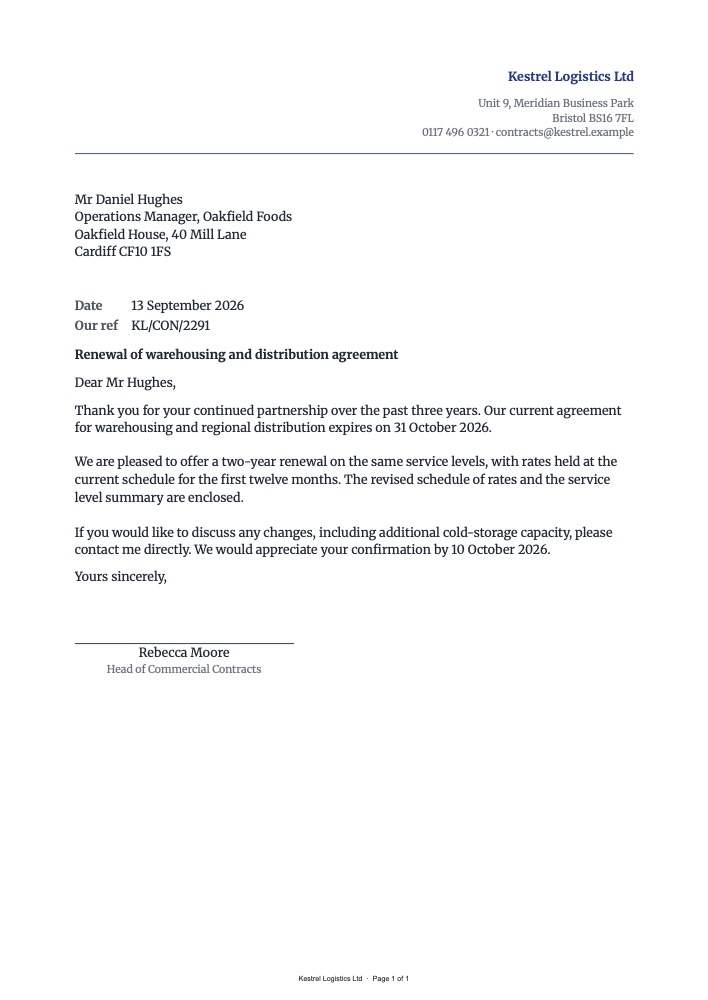
The Business letter (A4) template has:
- A letterhead with your logo on the left and your name, address and contact details on the right
- The recipient’s name and address below the letterhead
- Date and reference (formatted in the template’s language, e.g. “13 September 2026”)
- A bold subject line, the salutation, the body, and the closing
- A signature line with the signatory’s name and title
- A footer with your company name and page numbers
curl -X POST https://api.podpdf.com/templates/YOUR_TEMPLATE_ID/render \
  -H "X-API-Key: YOUR_API_KEY" \
  -H "Content-Type: application/json" \
  -o KL-CON-2291.pdf \
  -d '{
    "data": {
      "sender": { "name": "Kestrel Logistics Ltd", "address": "Unit 9, Meridian Business Park\nBristol BS16 7FL", "contact": "contracts@kestrel.example" },
      "date": "2026-09-13",
      "reference": "KL/CON/2291",
      "recipient": { "name": "Mr Daniel Hughes\nOperations Manager, Oakfield Foods", "address": "Oakfield House, 40 Mill Lane\nCardiff CF10 1FS" },
      "subject": "Renewal of warehousing and distribution agreement",
      "salutation": "Dear Mr Hughes,",
      "body": "Thank you for your continued partnership...\n\nWe are pleased to offer a two-year renewal...",
      "closing": "Yours sincerely,",
      "signatory": { "name": "Rebecca Moore", "title": "Head of Commercial Contracts" }
    }
  }'
Blank lines in body (\n\n) become paragraph breaks, so you can send the whole letter as one field. A long letter continues onto a second page with the page number in the footer.
Personalising the Body
There are two ways to personalise a letter:
- Send the finished body text from your system, as above — best when every letter is different.
- Write the body in the template with fields in it — best for standard letters where only a few details change:
Your agreement {{contract_number}} ends on {{end_date}}. To renew at your current rate of {{monthly_fee}} a month, please reply by {{reply_by}}.
Add those fields in Fields & test data; dates and amounts are formatted for the template’s language and currency. The wording then lives in the template, and the legal or marketing team can update it without a code change.
Your logo can be uploaded in the image block, or sent per letter as sender.logo_url — useful if one system sends letters for several brands.
Envelopes
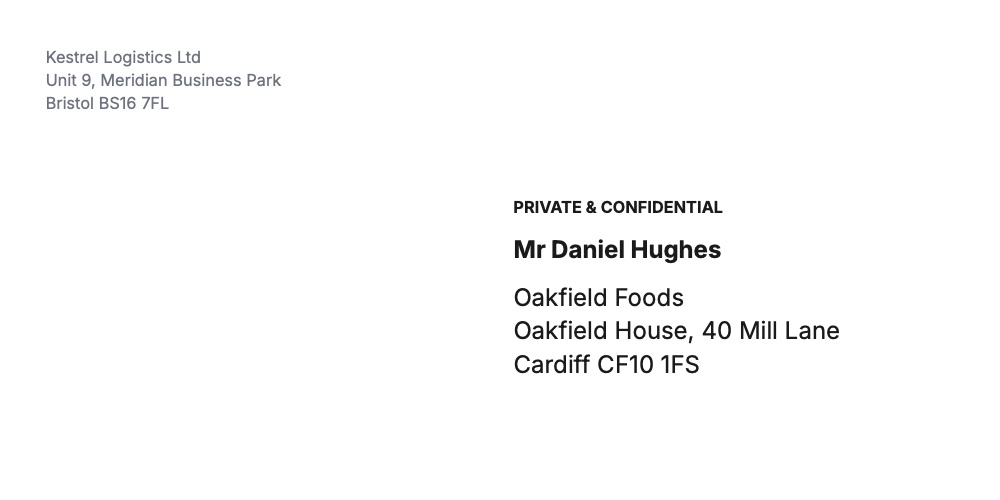
The Envelope (DL, 220 × 110 mm) template prints your return address top left and the recipient in large type on the right half, where the address goes, with an optional reference line such as PRIVATE & CONFIDENTIAL above the name.
{
  "data": {
    "sender": "Kestrel Logistics Ltd\nUnit 9, Meridian Business Park\nBristol BS16 7FL",
    "reference": "PRIVATE & CONFIDENTIAL",
    "recipient_name": "Mr Daniel Hughes",
    "recipient_address": "Oakfield Foods\nOakfield House, 40 Mill Lane\nCardiff CF10 1FS"
  }
}
For C5 or #10 envelopes, choose Custom size in Page & style (C5 is 229 × 162 mm, #10 is 241 × 105 mm) and adjust the address position. For sticky address labels instead, see the address label template.
Running a Mailing
For a mailing, render a letter and an envelope for each recipient, then combine them:
- Loop over your recipient list and render the letter and the envelope for each
- Merge all the letters into one PDF and all the envelopes into another
- Print the letters on A4 and feed DL envelopes for the second file, both at actual size
For emailed letters, skip the envelope. Mail merge sends each recipient their letter as a PDF attachment from your own mailbox: upload the spreadsheet, write the email, and send. To trigger letters from another app instead, a spreadsheet row per recipient can drive the same thing in Zapier or n8n (Zapier, n8n).
Use Cases
- Contract renewals and notices: generated when a contract reaches its notice period
- Welcome letters: for new customers, members, tenants or patients
- Payment reminders: polite first reminders and formal final notices
- HR letters: offers, confirmations, reference letters — see HR documents
- Price change notices: one letter per customer with their old and new price
- Charities: thank-you letters to donors, with a donation receipt
- Legal and compliance: notices that must be posted, with a PDF copy kept on file
Pricing
Each letter or envelope is one PDF at $0.01. A mailing of 500 letters with envelopes is 1,000 PDFs.
Get Started
- Open the template library and filter by Letter
- Read the templates API reference
- Related guides: HR letters and payslips, address labels, all PDF templates